
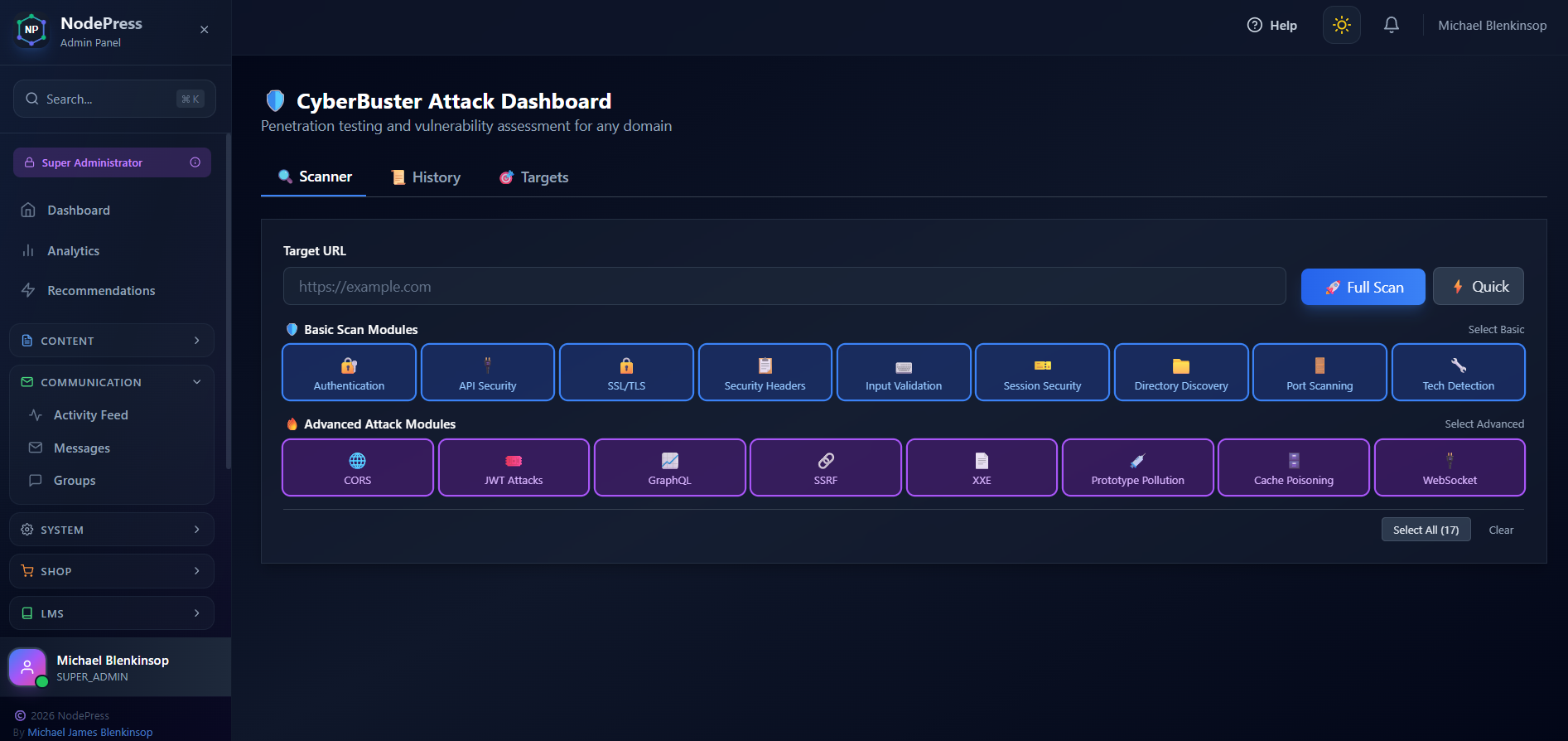
Is your website truly secure? In today's threat landscape, hoping for the best isn't a strategy. That's why we built CyberBuster – a powerful, built-in security scanner that puts enterprise-grade penetration testing at your fingertips.
What is CyberBuster?
CyberBuster is a comprehensive attack dashboard that lets you test any domain for security vulnerabilities. Whether you're managing multiple websites, checking a client's security posture, or hardening your own infrastructure, CyberBuster has you covered.
No more juggling multiple security tools or paying for expensive third-party scanners. Everything you need is right in your admin panel.
🔍 17 Security Modules
Basic Security Tests
🔐 Authentication – Login rate limiting, password policies, brute force protection
🔌 API Security – Endpoint protection, rate limiting, authentication checks
🔒 SSL/TLS – Certificate validation, TLS versions, cipher strength
📋 Security Headers – CSP, X-Frame-Options, HSTS, XSS protection
⌨️ Input Validation – SQL injection, XSS, command injection testing
🎫 Session Security – Cookie flags, session handling, timeout policies
📁 Directory Discovery – Sensitive files, exposed directories, backup files
🚪 Port Scanning – Open ports and running services
🔧 Technology Detection – Identify frameworks, servers, and libraries
Advanced Attack Modules
🌐 CORS Attacks – Wildcard origins, reflected origins, null origin bypass
🎟️ JWT Attacks – None algorithm exploit, weak secret detection
📈 GraphQL – Introspection attacks, query depth limits, batching vulnerabilities
🔗 SSRF – Server-Side Request Forgery detection
📄 XXE – XML External Entity injection testing
💉 Prototype Pollution – JavaScript prototype chain attacks
🗄️ Cache Poisoning – Header reflection, cache key manipulation
🔌 WebSocket – Origin validation, authentication checks
📊 Security Scoring
Every scan produces a security score from 0-100, giving you an instant snapshot of your security posture:
90-100: Excellent – Your site is well-hardened
70-89: Good – Minor improvements recommended
50-69: Fair – Several issues need attention
Below 50: Critical – Immediate action required
📄 Beautiful HTML Reports
Need to share results with your team or clients? CyberBuster generates stunning HTML security reports you can download with a single click.
Each report includes:
Executive summary with risk assessment
Detailed findings grouped by category
Severity ratings (Critical, High, Medium, Low, Info)
Specific remediation steps for each issue
Professional dark-themed design perfect for presentations
🎯 Save Your Targets
Frequently testing the same domains? Save them as targets with custom names, descriptions, and tags. Launch scans with one click instead of typing URLs repeatedly.
📜 Scan History
Every scan is automatically saved, so you can:
Track security improvements over time
Compare before/after results
Generate reports for past scans
Audit your security testing history
Getting Started
Navigate to Security → CyberBuster in your admin panel
Enter any URL you want to test
Select your modules (Basic, Advanced, or both)
Click Start Scan and watch the results roll in
Download your HTML report to share or archive
Security Testing, Simplified
CyberBuster transforms complex security testing into an intuitive, visual experience. No command-line tools. No complicated configurations. Just enter a URL and get actionable insights.
Your websites deserve better security. Start scanning today.
CyberBuster is included in NodePress at no additional cost. All scans run from your own server, ensuring your security testing stays private and under your control.